

Experience all four Walt Disney World Theme Parks this summer with the 4-Day, 4-Park Magic Ticket! Valid for arrivals from May 26 to Sept. 26, 2026.
For a limited time, you'll get a FREE $10 Disney Gift Card with the purchase of each eligible Walt Disney World® Resort Theme Park ticket purchase. Hop on this deal now while supplies last!


A visit to Walt Disney World is filled with a mountain of magical and memorable moments. For tadpoles, that can mean watching a favorite character come to life before their eyes, and for grown-up frogs, it's seeing that magical experience up close! Photos let us remember that perfect hug with Mickey or a princess twirl forever. Luckily for us, Walt Disney World offers a complimentary photo service called PhotoPass. PhotoPass photographers are stationed around the resort to grab those group shots — and some of them are sprinkled with a bit of extra pixie dust! PhotoPass also covers ride photos, character experiences and more. We've got all of the details about using PhotoPass, including which photo packages are available and which spots you don't want to miss. Say "cheese!"
Hop To

Overview of PhotoPass at Walt Disney World
Disney PhotoPass is the name of the photography service offered at Walt Disney World. This covers your ride photos, character meet-and-greets, as well as some optional stops around property with photographers. You'll find PhotoPass photographers stationed throughout the resort with unique backdrops such as the Tree of Life, Cinderella Castle, Millennium Falcon and more. Photographers may also be available at specific character experiences, including select character dining or meet and greets. There are often special photo ops for celebrations or events that are available only for a limited time, such as Mickey's Not-So-Scary Halloween Party and Mickey's Very Merry Christmas Party. Photographers can even sprinkle a bit of extra pixie dust with digitally enhanced Magic Shots.

While having your photo taken with the Disney PhotoPass service is free, downloading or keeping photos costs extra. Walt Disney World offers a few photo packages, including Memory Maker, that can be added on to your vacation so that you don't miss a single moment!
Accessing Your PhotoPass Photos
Using Disney PhotoPass service is toadally free, so you can take all the photos you would like and then decide if you would like to purchase any later. If you spot a PhotoPass photographer and would like a pic, hop in line. The PhotoPass photographer will ask for your MagicBand and quickly scan it (this is one of Lily's favorite jobs). After you ride an eligible attraction, you may see stations after the ride to tap your MagicBand beneath your ride photo (such as Tiana's Bayou Adventure or Test Track); others will automagically appear in your My Disney Experience account, such as Expedition Everest and Seven Dwarfs Mine Train.
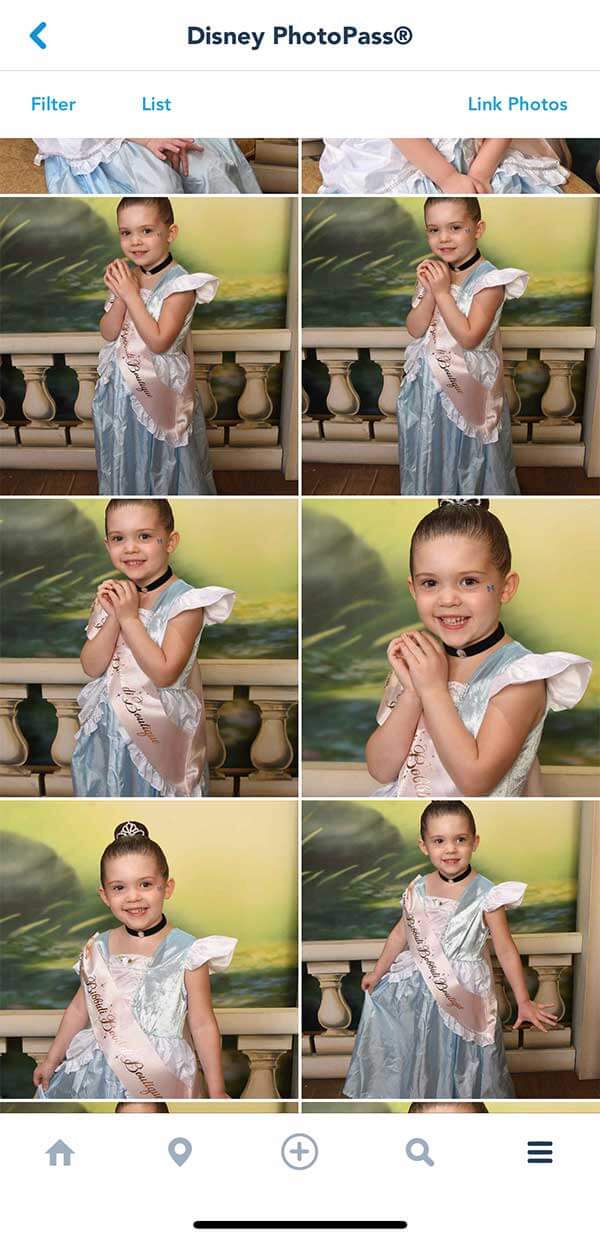
You can also use MagicMobile to link your photos to your account. The Disney MagicMobile service works like a MagicBand: you show your phone to the PhotoPass photographers for scanning. You can also get attraction photos automatically linked with just the magic of your phone! Just ensure Bluetooth is enabled on the My Disney Experience app, and the images should appear. You can still use your MagicBand or alternate between the two methods.
If you don't have a MagicBand, Key to the World card or MagicMobile, no worries! The PhotoPass photographer will hand you a card, so put it away for safekeeping. With a PhotoPass card, you'll need to follow the instructions on the back to manually link your photos to your My Disney Experience account.
Finding Your Photos in My Disney Experience
To find your photos in the My Disney Experience app, head to the bottom right menu with the three bars and scroll down until you see Photo Gallery. Tap that and see your photos! In the top right-hand corner, you'll see an option to Link Photos. This is where you can enter information from a PhotoPass card to populate your photos, either by scanning the card with the camera or by entering the code.
If you don't have a MagicBand, you'll also find the link to show your PhotoPass code here. We highly recommend snapping a screenshot of this—it makes it so much easier to show photographers without worrying about load time or battery life! Here, you can also manually link your Memory Maker if you purchased it without being logged into My Disney Experience.

Once linked, some photos may appear within only a few minutes, while others may take up to 48 hours to appear in your account. If you still can't find your photos, you can report a missing photo by calling (407) 560-4300 or stopping by any Disney PhotoPass Studio in the parks. Cast members will try to help you track it down!
In the My Disney Experience app, you can then view all of your photos and even filter by location. Plus, you can see all of the Friends and Family you are linked to, making it easy to see everyone's photos when traveling in a large group.
Purchasing Photo Packages
All the photos you take will be uploaded to My Disney Experience. Note that your photos will be watermarked until you purchase individual photos or a photo package, such as Memory Maker. You can opt to buy individual photos à la carte. To give you an idea of the price, photo downloads are generally about $18.95 for a set of two 4 x 6 prints or one 5 x 7 print, or $20.95 for one 8 x 10 print. If you want just a digital download of one photo, it costs $16.95. There are also personalized products available for purchase, such as magnets, ornaments and mugs. Do keep in mind that prices do not include tax or shipping and are always subject to change. If you think you'll only want a couple of photos, à la carte may be the way to go.

If you're an Annual Passholder, PhotoPass photo downloads can be added to your pass for $109 (plus tax, per year). Photos expire after one year with an annual pass add-on. If you're not an AP, photo packages are an additional cost. We highly recommend the annual pass add-on or purchasing Memory Maker, which allows unlimited downloads (we'll go more in-depth below).
Disney World also has a private photoshoot option called Capture Your Moment. For 20 minutes, a PhotoPass photographer will discuss available locations and discuss what you'd like before, well, capturing the magic! Each session is $99. Downloads of your photos are included in Memory Maker; for those without an Annual Pass or Memory Maker, images can be purchased à la carte. To book a Capture Your Moment session, call 407-939-7758 or book online.

Attraction photo downloads are also included with the purchase of Lightning Lane Multi Pass! If you purchase Lightning Lane Multi Pass, you'll be able to download any ride photos from that day at no additional cost. This includes popular attractions such as Seven Dwarfs Mine Train, Space Mountain, Test Track and more! Check out our guide to Disney World ride photos for more details.
All About Memory Maker
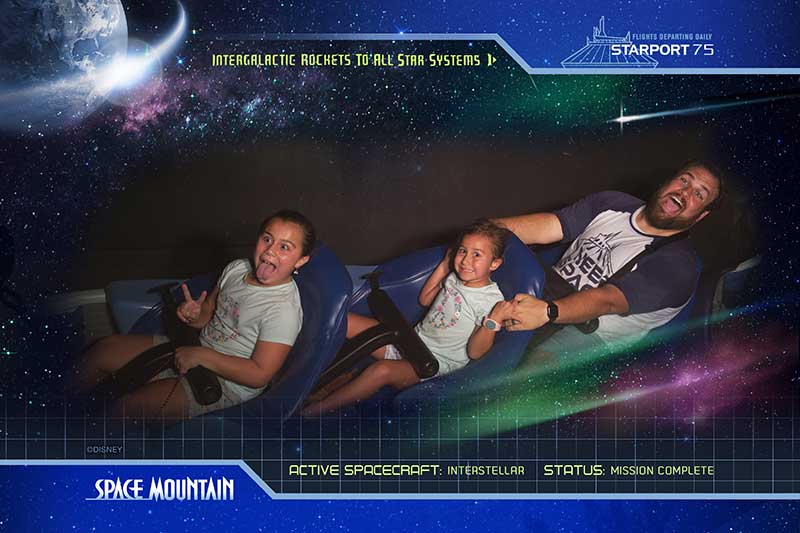
Photos can be purchased individually, but Walt Disney World also offers an unlimited photo package called Memory Maker. Memory Maker includes all images taken on a single day or throughout your visit. Also included in Memory Maker are ride photos and videos, as well as stock photos and videos. We've even gotten a voicemail from Buzz and Woody! Some of these enhancements are only available through Memory Maker — they can't be purchased separately. If you expect to buy more than a couple of photos or have a long trip ahead, there's value in getting Memory Maker, especially if you purchase it in advance of your trip.
Memory Maker is a photo package that includes all photos from your trip, whether it's a single day or 10 days. You can purchase Memory Maker in the My Disney Experience app or on the Disney World website. If you buy the package in advance, you can save some green! Memory Maker options include:
- Memory Maker Advance Purchase ($185) — includes all of your photos and videos from your vacation. You must wait at least three days after purchase to activate. Once activated, it lasts for 30 days.
- Memory Maker ($210) — includes all of your photos and videos from your vacation. May be used upon purchase. Once activated, it lasts for 30 days.
Downloading Your Photos
One added benefit of Memory Maker is that you can download your own Disney PhotoPass photos, as well as those for up to 25 members of your Family & Friends who share media with you on the My Disney Experience website or app! For large groups or even families who may split up, that means any of you who are connected can use your MagicBand to upload the photos to one central location, for one price.
Your photos will expire 45 days from the date they're taken. Once they expire, they can no longer be purchased or downloaded. If you need more time (as long as you're not past your expiration date), you can pay an additional fee to extend your access to the photos for a further 15 days.
When you download your photos, you'll get fairly large ZIP files that include some stock photos and videos, as well. We've noticed the files can sometimes be a little out of order, so if you want a perfect timeline of your trip, you may need to manually organize them yourself once they are on your device.
Memory Maker Pros and Cons

In this digital age, you may be wondering why you should waste your time on a photo service. Here are our honest thoughts on Memory Maker:
Memory Maker Cons:
- Your photos expire, so you have to remember to download them before they disappear.
- The cost. While you can save some money by buying in advance, it's still an added expense (and that's a lot of Dole Whips). The longer your trip, the more reasonable that cost may seem.
- If you're an avid photo-taker anyway, you may find your phone or camera is enough for you.
- While PhotoPass photographers will always be at the main park icons, they may rotate to other spots throughout the park and are not guaranteed to be at any one location all day.
Memory Maker Pros:
- Everyone can get in the photo! No more mom or dad missing as they snap the rest of the family or asking a stranger to help.
- You can get unique photos like action shots on attractions.
- Everyone on your Friends and Family list can get in on the photo fun for one price.
- You don't have to dig for your camera or remember to take photos — if you see a photographer, you can stop. Voila! For me, this takes one extra worry off my plate during a vacation.
- It's quick and easy to get your photo taken — the shot is already set and ready for smiles.
- While I know my way around a camera (and Tad really, really knows his way around a camera), PhotoPass photographers are true pros. They take better photos than I could most of the time.
- Most trip photos are then accessible in one central location.
Is Memory Maker Worth It?
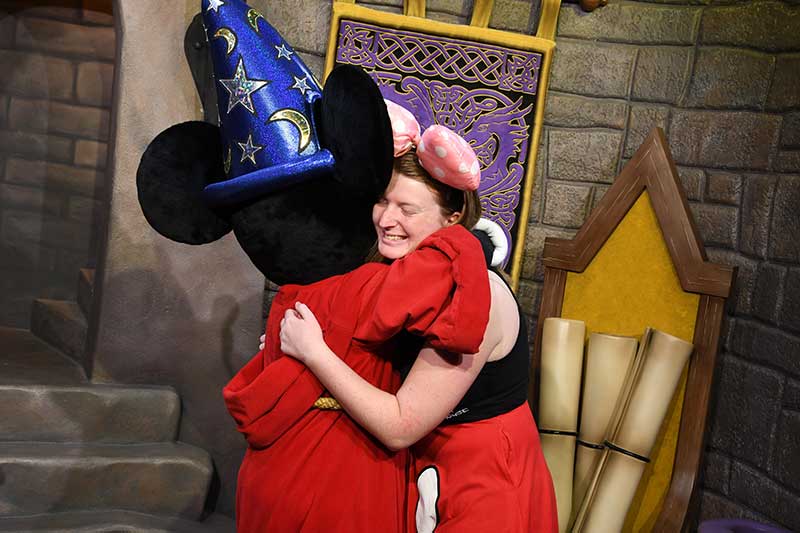
We get this question a lot, and our answer is always: That depends! You know your family and the number of photos you'd like best. If it's your first time at Walt Disney World and you'll be there a while, Memory Maker may be a good investment to ensure that you get all of those magical shots. If you're a seasoned visitor who will be there for a short period of time, you may find that purchasing must-have photos à la carte (or just getting attraction photos via MultiPass) and using your phone the remainder of the time is all you need. We personally highly recommend Memory Maker and think it's worth going all-in on capturing these magical memories, but this, of course, varies by family.
No matter what you decide, we are big fans of the Disney PhotoPass service. From capturing the wonder of seeing Mickey Mouse in person for the first time, to adding pixie dust to otherwise traditional shots, it always leaves a little extra magic in our photo memories.
Special Photo Spots
Recently, we saw a line for a PhotoPass photographer on an average wall in Batuu, and we thought, "That's strange." Guess what? While the wall looked basic, the PhotoPass photographer had a Magic Shot — a special effect that shows up in your photos — featuring Baby Yoda, er, I mean Grogu.
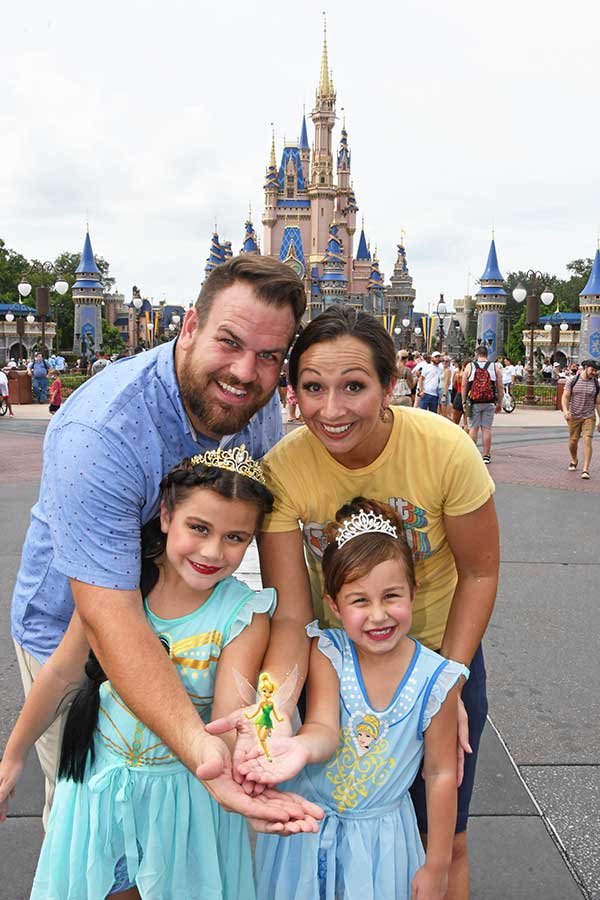
Exclusive to PhotoPass, Magic Shots are photos with a bit of extra pixie dust. Others we've seen include Tinker Bell appearing in your hands or Remy scurrying away. There are even some shots that involve perspective, such as Tiny World and Super Zoom (taking you standing next to Cinderella Castle, to a view high above Main Street, back to pinpointing you among the other guests!). You'll often find memorable photo-ops during festivals or special events, with props, Magic Shots and backdrops. You'll have plenty of opportunities to take iconic photos!
If you're looking for some additional selfie spots, there are also some Instagram-worthy walls around property, including:
Magic Kingdom
- The Purple Wall (near Monster's Inc. Laugh Floor in Tomorrowland)
- Neverland Wall (Fantasyland, outside of Peter Pan's Flight)
- The Tangled Wall (the restroom area in Fantasyland — and you'll sometimes find a PhotoPass photographer with a lantern prop as night falls!)

Disney's Animal Kingdom
- Fichwa Fellow (outside of Harambe Market in Africa)
- "You Are Most Beautiful" (in Harambe Market in Africa)
- Moss Wall (Pandora, near Satu'li Canteen)
- The Coca-Cola Wall (near Drinkwallah, in Asia)
- Children of the World wall (across from Harambe Market, Africa)
EPCOT
- Bubblegum Wall (near the exit doors to Spaceship Earth)
- Toothpaste Wall (The Seas with Nemo and Friends, as you exit the pavilion)
Disney's Hollywood Studios
- Batuu Blue Stripe Wall (next to the entrance to Droid Depot in Galaxy's Edge)
- Popsicle Stick Wall (Toy Story Land)
At any time, you can log into My Disney Experience and see where PhotoPass stops are near you! Hop into the map function and toggle to PhotoPass. And be sure to check out our top 10 favorite PhotoPass stops you won't want to miss!
PhotoPass Tips and Tricks
Here are some additional tips and tricks for using Disney PhotoPass:
- If you're interested in Memory Maker, be sure to purchase in advance to save some green! Likewise, be sure anyone hopping along for the trip is on your Family & Friends list in My Disney Experience so that you can share photos.
- If you have Memory Maker —my kids hate me for this —I suggest you stop at (almost) every PhotoPass stop. Since all photos are included in your Memory Maker, it never hurts to grab extra shots! While most of the pictures we've taken have been of good quality, you won't always get the perfect shot. Take advantage of the options available to you so you have plenty to choose from.
- There are often several photo stops for the same area; there are usually about four or five for Cinderella Castle! If there's a long line at one, and you aren't particular about the shot, keep walking. On Main Street, U.S.A., especially, folks tend to stop at the first photographer they see, so that first line is often the longest.
- PhotoPass photographers are great about different configurations in the shot, but if you have a particular setup or shot in mind, it never hurts to ask. When Tad got a button for making Honor Roll, for example, the rest of us got kicked out of the shot to shine the spotlight on him — and we asked if Lily could join him for one afterward.
- On that note, if you are celebrating something, iconic photos are a great way to commemorate the trip!
- Ask about Magic Shots. If that particular photographer doesn't have one available, they can point you to someone who does!
- PhotoPass stops, MagicShots and special effects are always changing. Stop and ask if you have questions — cast members are hoppy to help!
- Set a calendar appointment or reminder to snag your photos before they expire if you invested in Memory Maker!
- If you have a dining reservation close to or after park closing, keep an eye out! PhotoPass photographers are often around even as the park closes, snapping those beautifully-lit nighttime shots.

Have you used Disney PhotoPass or Memory Maker before? What were your thoughts? Did we miss any tips or tricks? Be sure to share with us in the comments below!
Related: Our Favorite Holiday Photo Spots at Disney World
Everything You Need to Know About Walt Disney World Ride Photos
Hoppy planning!